Factories > Overview
How Warp Factories work
Build workflows on Warp Factories infrastructure, configure routing and human checkpoints, and compare changes with Scorers and benchmarks.
Warp Factories provides the infrastructure for development workflows you define and configure. Your definition files connect repositories, configured agents called workers, and automations. Use Scorers to check runs against criteria you define, and benchmarks to compare configurations on the same tasks. See Measure and improve.
The foreman drives the workflow and communicates through the tool where work started, such as Slack or Linear. A Blueprint defines its stages, worker assignments, procedures, transitions, and human gates. Those workflow instructions take precedence over stage lists in worker prompts.
A work item is a single request the factory acts on, such as an issue, support request, pull request, or Factory MCP task. It keeps its identity from intake to handoff, however many workers contribute to it along the way.
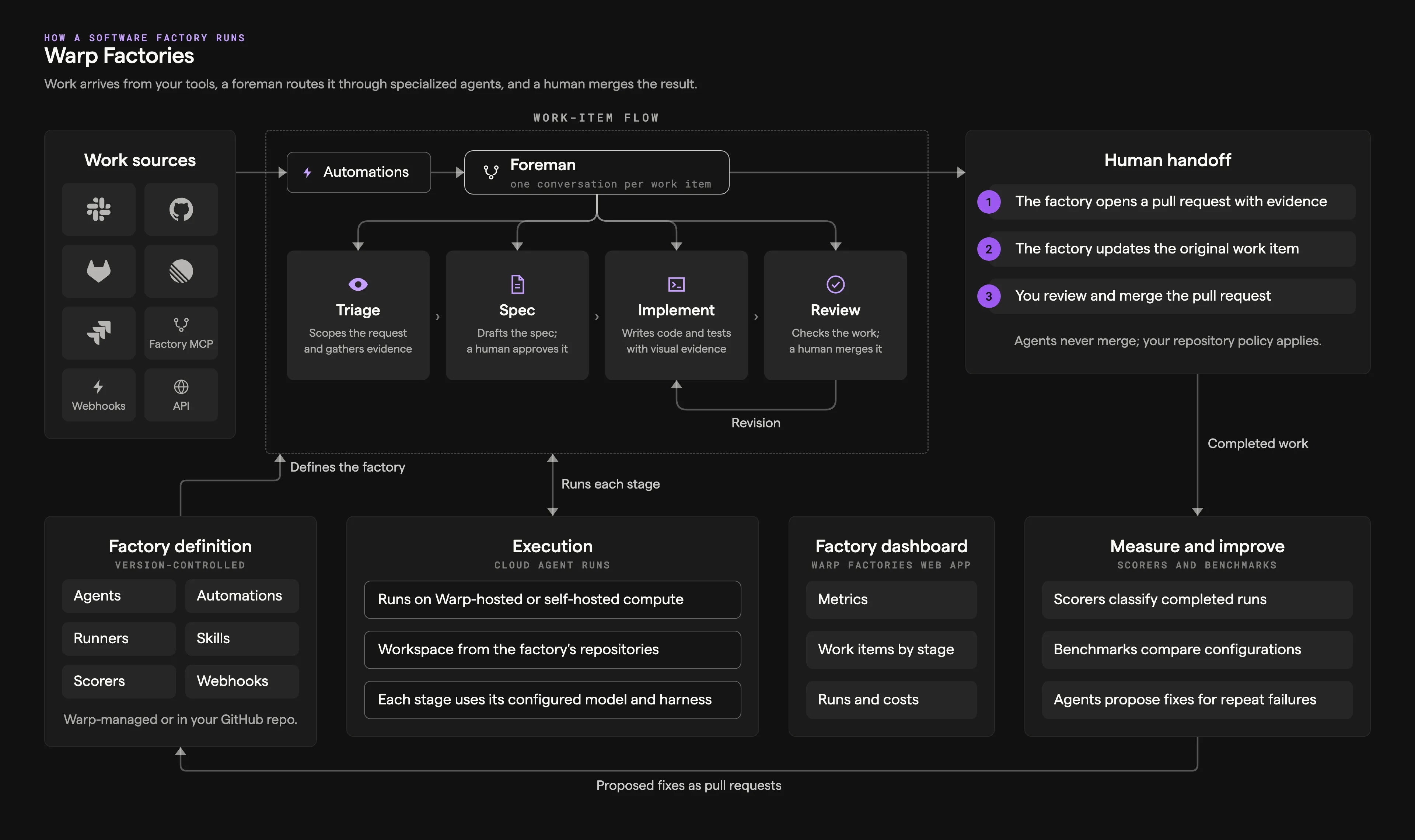
How a work item moves through the factory
Section titled “How a work item moves through the factory”The foreman gathers the top-level stages’ declared inputs from the request and earlier results. It runs stages assigned to itself and delegates other stages to their workers, continuing existing conversations for revisions. A worker assigned a group of stages coordinates that group’s work.
Not every work item needs every stage. The coordinating worker takes the first transition whose prose condition matches the request or the preceding stage’s outputs. Configure those transitions to skip work that is already defined or send changes back for revision.
Stages
Section titled “Stages”The diagram below shows a typical issue-to-PR workflow. Your Blueprint chooses which stages run and when work returns for revision.
flowchart LR
  Intake[Intake] --> Foreman[Foreman]
  Foreman --> Triage[Triage]
  Triage --> Decision{Plan needed?}
  Decision -->|Yes| Planning[Planning]
  Decision -->|No| Building[Building]
  Planning --> Approval["Human review<br/>(default policy)"]
  Approval --> Building
  Building --> Reviewing[Reviewing]
  Reviewing --> Revision{Revision needed?}
  Revision -->|Yes| Building
  Revision -->|No| Handoff["Human handoff<br/>(default policy)"]
  Handoff -->|"Merge notification<br/>or human confirmation"| Complete[Complete]
- Intake - A work item enters from a connected integration, an automation, a direct run, or the Factory MCP. Automations filter events and schedules and select a worker or Blueprint entry stage. Direct requests go to the foreman. The work item keeps its source context as it moves through later stages.
- Triage - The assigned worker researches the request, reproduces the problem when needed, and defines the scope and complexity of the change. A transition can skip triage when the request already establishes the cause and scope.
- Planning - The assigned worker defines product behavior, technical constraints, and validation criteria. A transition can skip planning for small, well-understood changes.
- Building - The assigned worker makes the code change on a branch and opens a pull request with test and visual evidence.
- Reviewing - The assigned worker checks the change against the requirements, tests, and security expectations, then returns findings for another pass. Its verdict is advisory.
- Human handoff - The factory presents the result, its evidence, and any findings, and updates the original work item. A person decides what happens next.
- Complete or Cancelled - By default, the foreman completes the work item after a merge notification or confirmation that the pull request landed. Handoff alone doesn’t complete it. A cancellation stops the work early.
Stages and workers are named separately. One worker can run several stages; add a separate worker when a stage needs different tools or independent review. See About factory workers.
These lifecycle names describe the default workflow, not a required sequence or a list of Blueprint stage identifiers. A Blueprint’s stage names come from its definition. Existing work retains the Blueprint selected when its run started, even after you apply a definition change.
Each worker’s run is a cloud agent run on Warp-hosted or managed self-hosted compute, using the factory’s repositories and the worker’s configured model and harness. Watch and steer runs from the factory’s Runs page. Work that needs your input appears in the Waiting on you status filter on Home.
Where your team stays in charge
Section titled “Where your team stays in charge”A factory pauses when a person needs to decide. By default, that’s three places:
- Approving the spec - When work needs a spec, implementation waits until a person signs off on the plan.
- Answering questions - When requirements are unclear or a review finding is ambiguous, the foreman asks instead of guessing.
- Merging - The factory opens the pull request and hands it off. Whether and when it merges is your team’s call.
Add gates for the first two decisions. Answer them in the original conversation with the foreman. A gate waits for your answer; outgoing transitions distinguish approval from requested changes. Use branch protection and repository permissions to enforce human-only merges.
How the factory improves itself
Section titled “How the factory improves itself”Scorers classify completed runs against criteria you write, and Self-improvement groups the failures they flag into follow-up runs that propose fixes to the application code or to the factory’s own definition. Every proposal arrives as a pull request for your review; nothing is adopted on its own.
Use benchmarks to compare configurations on the same tasks.
A factory’s workers, automations, runners, scorers, skills, and webhooks are configured in definition files, either managed by Warp or stored in a GitHub repository your team owns. Anyone on the team, or a worker, can propose changes to the definition, including its instructions, skills, and models. Definitions stored in GitHub go through pull request review and configuration checks before a change reaches the production branch.
Related pages
Section titled “Related pages”- About Blueprints - Choose stages, transitions, and human gates
- Sizing a factory - Which repositories belong in one factory.
- About factory workers - What each default worker does and how to configure it.
- Connect your factory - Every way work can enter a factory.
- Measure and improve - Scorers, benchmarks, and Self-improvement.
- Build a self-improving agent - Apply the same loop to a standalone agent.